Small Ro · Ragnarok Online

Smart Market

Account tools, rankings, wiki, database, downloads, and server services.

Latest Updates
Small Ro is ready — welcome, adventurer!
Explore classes, equipment, instances, and gameplay guides.
Download the client, patch up, and start your journey in Midgard.
Manage account settings, character tools, and game services.
Browse monsters, items, MVP data, rankings, and server information.
Join the community Discord and stay connected with your guildmates.
Small Ro is ready — welcome, adventurer!
Explore classes, equipment, instances, and gameplay guides.
Download the client, patch up, and start your journey in Midgard.
Manage account settings, character tools, and game services.
Browse monsters, items, MVP data, rankings, and server information.
Join the community Discord and stay connected with your guildmates.
Systems
Smart Market

Small Ro · Systems

Smart Market

A global board that takes Zeny or Cloud Points. Search, buy, list, auction, and collect from one desk — without standing in a shop row.

OpenSmart Market icon
Pay withZeny or CP
WalletsBank · Market CP · Character CP
Fee1.5% on a listing

The icon opens the secure global trading desk. Listings you post here are visible to the whole server.
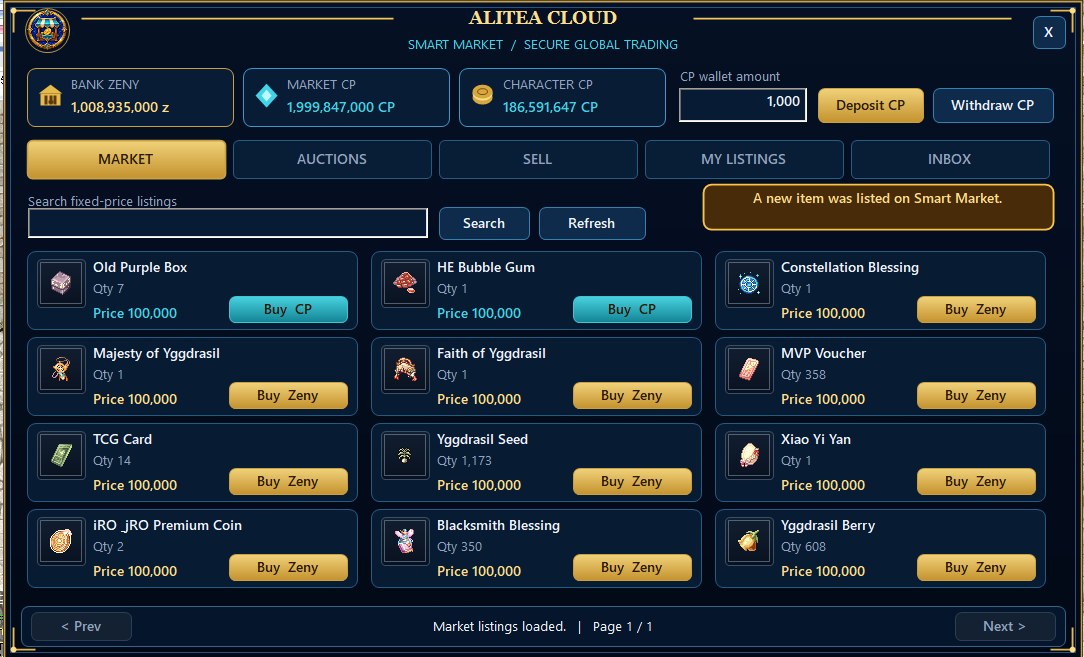
The board

Smart Market listings
Market tab — search, Buy Zeny or Buy CP, wallets across the top.

Three numbers sit above every tab so you always know which purse will pay:

  • Bank Zeny — the account vault.
  • Market CP — Cloud Points parked on the market.
  • Character CP — Cloud Points on this character.

Deposit CP moves character points onto the market. Withdraw CP brings them back. Type the amount first.

Tabs along the desk:
  • Market — fixed-price listings. Search a name, refresh, buy with the currency the seller chose.
  • Auctions — timed bids instead of a flat price.
  • Sell — put your own items on the board.
  • My Listings — what you still have up.
  • Inbox — coin and items coming back to you.

Selling

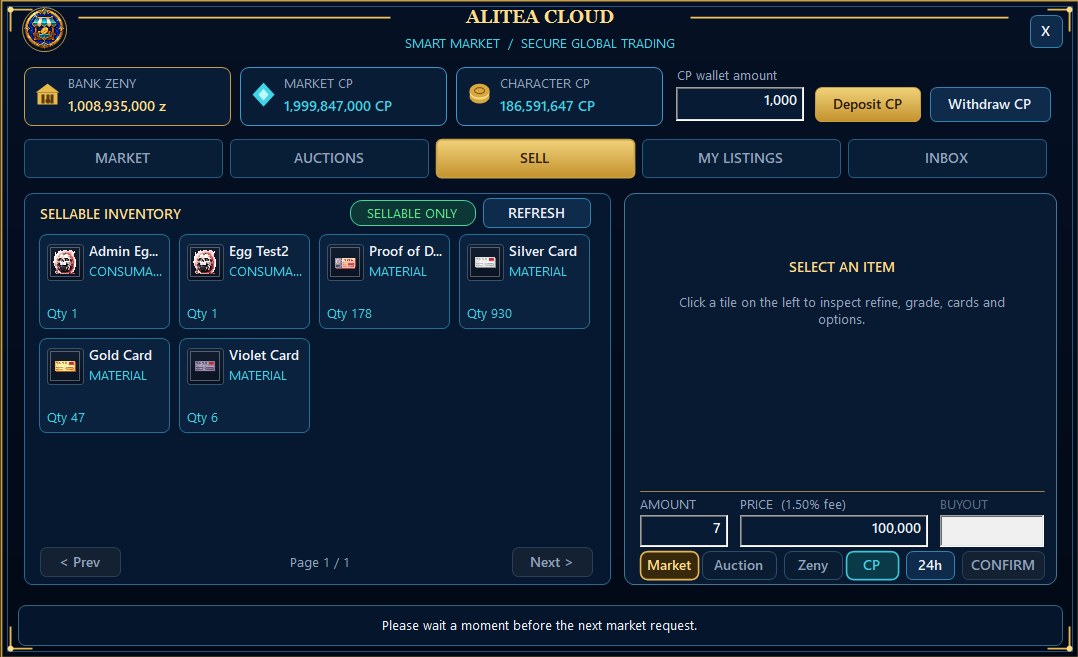
Smart Market sell desk
Sellable inventory on the left. Amount, price, currency, duration, confirm on the right.

Only items the board will take appear under Sellable Only. Click a tile to inspect refine, grade, cards, and options before you price it.

  • Set amount and price. The listing fee is 1.5%.
  • Choose Market or Auction.
  • Choose Zeny or CP.
  • Choose how long the listing stays up.
  • Confirm once. Wait for the desk to finish before the next request.
Keep weight and empty slots ready for purchases and returned listings. The desk checks inventory before it delivers.

Why use it

No shop row

You do not stand in town hoping the right buyer walks past. The whole server sees the listing.

Two currencies

Sellers pick Zeny or CP. Buyers see the matching button. No mixed purse surprise at confirm.

Safe hand-off

Coin and items move through the desk, not through a whisper and a drop.