Small Ro · Ragnarok Online

Character Info

Account tools, rankings, wiki, database, downloads, and server services.
Latest Updates
Small Ro is ready — welcome, adventurer!
Explore classes, equipment, instances, and gameplay guides.
Download the client, patch up, and start your journey in Midgard.
Manage account settings, character tools, and game services.
Browse monsters, items, MVP data, rankings, and server information.
Join the community Discord and stay connected with your guildmates.
Small Ro is ready — welcome, adventurer!
Explore classes, equipment, instances, and gameplay guides.
Download the client, patch up, and start your journey in Midgard.
Manage account settings, character tools, and game services.
Browse monsters, items, MVP data, rankings, and server information.
Join the community Discord and stay connected with your guildmates.
Systems
Character Info

Small Ro · Systems

Character Info

One profile for the whole build. Combat Power and grade on the left. Final numbers in the middle. Every bonus traced to the piece of gear that paid it.

OpenCharacter Info icon
PowerCombat Power + grade
SplitStats and Traits
TraceWhere each bonus comes from

The toolbar icon opens the sovereign profile. The numbers on the panel are calculated on the server, then shown. What you see is what the fight uses.
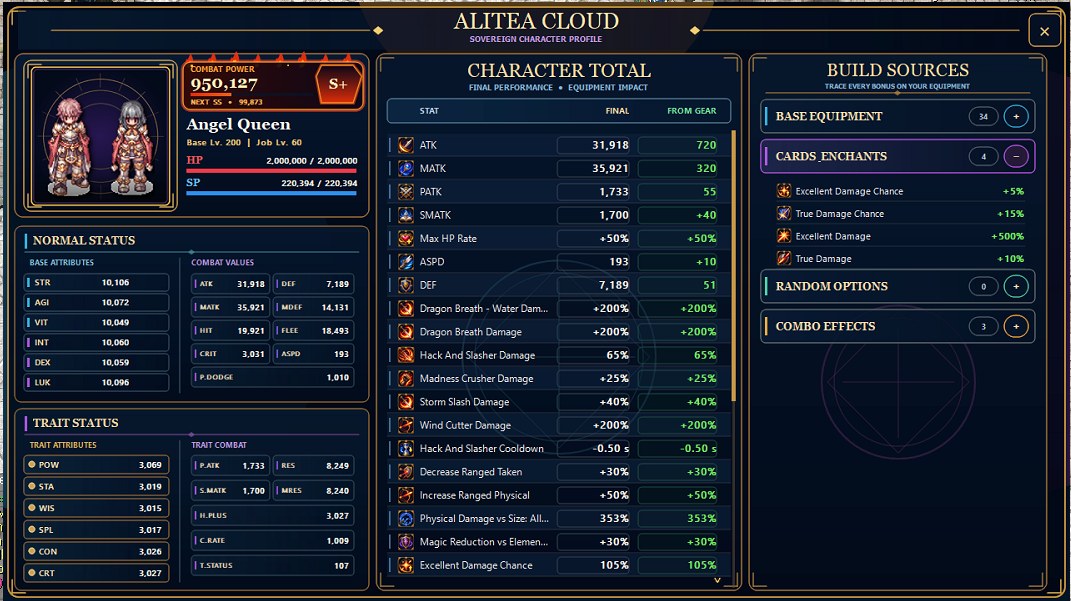
The profile

Character Info panel
Portrait and Combat Power, Normal Status, Trait Status, Character Total, Build Sources.

The left column is identity. Sprite, Base and Job level, HP and SP, then Combat Power with the grade beside it. Under that, attributes split the way the server actually stores them:

  • Normal Status — STR, AGI, VIT, INT, DEX, LUK, and the combat values they feed.
  • Trait Status — POW, STA, WIS, SPL, CON, CRT, and the trait combat line.

The middle column is Character Total. Each row shows the final value and how much of it comes from gear. If a line is almost all green, the piece on your body is doing the work. If Final and From Gear match, the bonus is equipment — not the raw stat sheet.

Build Sources

Base Equipment

The slots themselves. Weapons, armor, garments, accessories.

Cards & Enchants

Excellent and True Damage, chances, and other card or enchant lines.

Random Options & Combos

Rolled options and set bonuses, counted separately so a combo is not mistaken for a card.

Open a source to see the exact bonuses it is paying. Close it when you are comparing two pieces and only care about the total.

The panel refreshes when equipment changes. It does not sit there rebuilding while you stand still.

Why open it

  • Check Combat Power after a swap without leaving town.
  • See whether a new card actually moved the total, or only the flavor text.
  • Separate Trait combat from Normal combat when a 4th-job line looks “low” for the wrong reason.